AirLLM Studio
Big models. Everyday hardware.
Run 70B-class language models on a single consumer GPU, or even on the CPU. A desktop app, command line and local API, built on AirLLM.
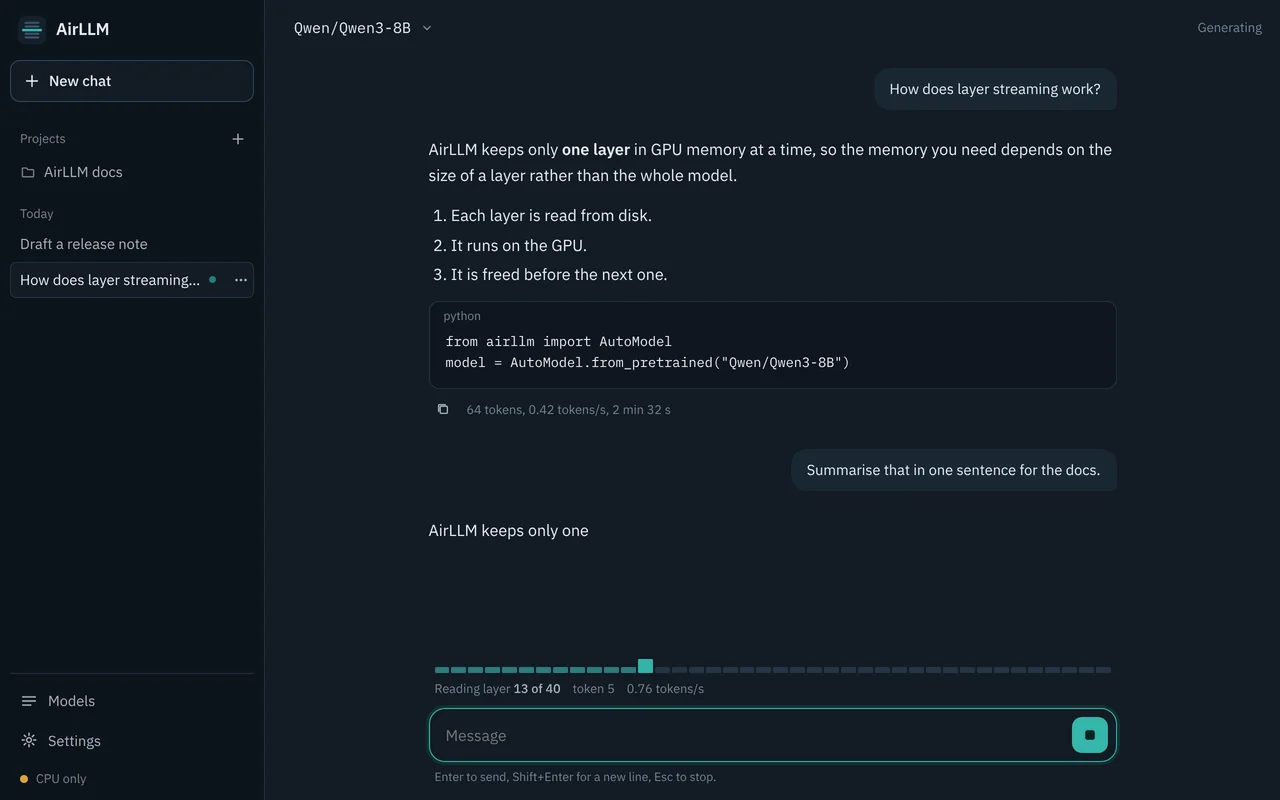
One layer in memory at a time.
A normal runtime has to fit the whole model in memory. AirLLM doesn’t. Memory use stays at a few gigabytes, whatever the model’s size.
-
Read a layer
For each token, the next layer of the model is read from your disk.
-
Run it
The token passes through that layer on your GPU, or on the CPU.
-
Free it
The layer leaves memory before the next one arrives. Then it starts again.
seconds per token ≈ model size on disk ÷ disk read speed
The trade is speed for the ability to run it at all. A fast NVMe SSD, a GPU and 4-bit layer compression all help.
The right tool
When you want a model bigger than your memory, 27B, 32B, 70B and up, and you can wait for the answer.
Not the right tool
When the model already fits in your GPU. A runtime that keeps it there is far faster, and Studio speaks the same Ollama API, so you can use both.
Everything in one install.
No Python, pip or CUDA toolkit to set up. Each package brings its own Python, PyTorch and AirLLM.
-
Desktop app
Chats with history, streaming answers and a live layer meter. Keep browsing while an answer is written.
-
Model library
Search Hugging Face, pull a model and watch it download and get split into layers, with progress.
-
Projects
Group chats under shared instructions and text files that every chat in the project sees.
-
Images and voice
Attach images for models that can see them. The buttons appear only when the model can use them.
-
Command line
airllm pull,run,list,ps,serveand more, from any terminal. -
NVIDIA GPUs
Packages ship with CPU PyTorch. One command,
airllm-enable-cuda, switches to a CUDA build.

Speaks Ollama. And OpenAI.
A local server on port 11435 answers both APIs, so Open WebUI, the OpenAI SDKs and your own scripts can use your models.
Ollama API
curl, Open WebUI, Ollama clients
curl http://127.0.0.1:11435/api/chat -d '{
  "model": "Qwen/Qwen3-8B",
  "stream": false,
  "messages": [{
    "role": "user",
    "content": "Explain AirLLM."
  }]
}'OpenAI API
Any OpenAI SDK
from openai import OpenAI

client = OpenAI(
    base_url="http://127.0.0.1:11435/v1",
    api_key="local")
reply = client.chat.completions.create(
    model="Qwen/Qwen3-8B",
    messages=[{"role": "user",
"content": "Hi"}])Run it as a service for other machines with sudo systemctl enable --now airllm and an API key. Server mode
Your models. Your machine.
Installed with its defaults, nothing outside your computer can use AirLLM Studio.
-
No telemetry
No analytics, no accounts, no update check. It connects only to Hugging Face for models, and to PyTorch’s servers if you turn on CUDA.
-
Local by default
The server listens on
127.0.0.1only. Other computers need an API key you set. -
Web pages are kept out
Origin and Host checks stop websites in your browser from calling the API or reading its answers.
-
No surprise code
Models that ship their own Python code are refused until you allow them, one model at a time.
Get AirLLM Studio.
Version 4.0.1-1, released . Includes AirLLM 4.0.1.
-
Windows
Windows 10 and 11, 64-bit
-
Debian and Ubuntu
Debian 12+, Ubuntu 22.04+
-
Fedora and RHEL
Fedora, Rocky, AlmaLinux 8+
Packages are 200–360 MB. Install commands, checksums and GPU setup
An independent project. AirLLM Studio is made by Rudra Labs and is not affiliated with, sponsored or endorsed by the authors of AirLLM. AirLLM is bundled unmodified under the Apache License 2.0. Legal and licensing